GlassShader
In SkyRenderer you can find multiple shaders that are prepared for simulating ray behavior on glass surfaces.
In this tutorial you will get familiar with GlassShader, which is the basic shader for surfaces made from glass.
Agenda:
- GlassShader theory
- GlassShader basic usage
Scene setup
Let's use custom scene composer to set up the scene.
from skyrenderer.cases.utils import GlassShaderSceneComposer scene_composer = GlassShaderSceneComposer()
scene_composer.setup_scene()2026-01-05 14:40:04,955 | skyrenderer.scene.renderer_context | INFO: Root paths: - root path: /dli/skyenvironment/content-marketing/skyrenderer/skyrenderer - assets path: /dli/mount/assets - config path: /dli/skyenvironment/content-marketing/skyrenderer/skyrenderer/config - gpu sources path: /dli/skyenvironment/content-marketing/skyrenderer/skyrenderer/optix_sources/sources - cache path: /dli/mount/cache - ptx cache path: compiled_ptx/ptx - ocio path: ocio_configs 2026-01-05 14:40:05,200 | skyrenderer.basic_types.provider.unit_providers.substance_texture_provider | WARNING: Unable to map purpose diffuse. Map will be parsed with legacy system. Purpose not present in ['ambientocclusion', 'basecolor', 'coatweight', 'coatroughness', 'emissive', 'height', 'metallic', 'normal', 'opacity', 'refractioncolor', 'roughness', 'specular', 'scattering', 'scatteringcolor', 'visibility', 'texturesemanticmap', 'any', 'mask', 'spectralid'] See: Texture and substance convention for more details. Remember, purpose mapping is case insensitive. Parsed purpose : diffuse_map 2026-01-05 14:40:05,200 | skyrenderer.basic_types.provider.unit_providers.substance_texture_provider | WARNING: Unable to map purpose glossiness. Map will be parsed with legacy system. Purpose not present in ['ambientocclusion', 'basecolor', 'coatweight', 'coatroughness', 'emissive', 'height', 'metallic', 'normal', 'opacity', 'refractioncolor', 'roughness', 'specular', 'scattering', 'scatteringcolor', 'visibility', 'texturesemanticmap', 'any', 'mask', 'spectralid'] See: Texture and substance convention for more details. Remember, purpose mapping is case insensitive. Parsed purpose : glossiness_map 2026-01-05 14:40:05,204 | skyrenderer.basic_types.provider.iprovider | WARNING: Provider for this config has been already initialized! There should be just one Provider created per unit source, consider fixing the scene. Config: metal_material
GlassShader theory
GlassShader simulates the appearance of transparent, refractive materials like glass or water. It focuses on two
key effects: refraction and reflection. When light passes through glass, it bends due to changes in speed between
different mediums, defined by the material index of refraction (IOR). To enhance realism, the model uses
the Fresnel factor to determine how light reflects at different viewing angles.
This model can be used for either one-sided geometries, double-sided thin geometries or geometries with
significant volume. To achieve realistic effects, it is important to correctly choose IOR parameter to each case,
e.g. IOR=1.0 for one-sided glass like windows.
GlassShader basic usage
Let's create a Material Definition using GlassShader and assign this material to the envelopes of the lightbulbs.
To assign the material we will use RendererContext's set_material_definition() method.
To find out how different parameters affects GlassShader appearance, check out SHADER_GlassShaderParameters
tutorial.
    from skyrenderer.scene.scene_layout.layout_elements_definitions import MaterialDefinition
    from skyrenderer.basic_types.procedure.shader.basic_shaders.glass_shader import GlassShader
glass_shader = GlassShader(scene_composer.renderer_context)
material_definition = MaterialDefinition(shader=glass_shader)
scene_composer.renderer_context.set_material_definition(
node_name="lightbulb_GEO_Glass*", material_definition=material_definition, use_regex=True
)
scene_composer.visualize()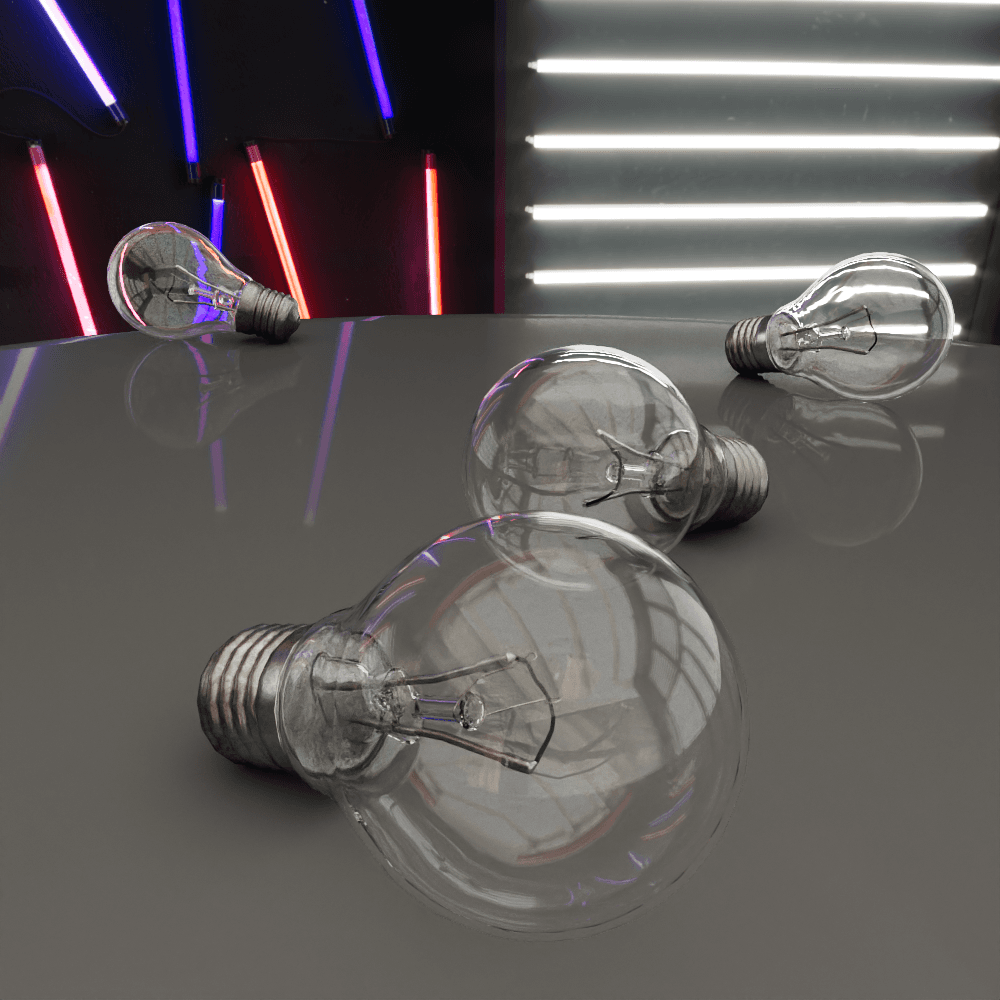
2026-01-05 14:40:05,326 | skyrenderer.utils.time_measurement |  INFO: Setup time: 107 ms

2026-01-05 14:40:08,889 | skyrenderer.utils.time_measurement |  INFO: Context update time: 3.56 seconds

2026-01-05 14:40:14,501 | skyrenderer.utils.time_measurement |  INFO: Key points calculation time: 0 ms

2026-01-05 14:40:14,502 | skyrenderer.utils.time_measurement |  INFO: Render time: 5.61 seconds
Summary
In this section you have learnt:
- GlassShader simulation focuses on two effects: reflection and refraction of the material.
- GlassShader is used for variety of surfaces made from glass: glass bottles, windows etc.